
How to Install CleanMyTube Extension on Chromium-Based Browsers
The CleanMyTube extension is packaged within the Mac app. Once you enable it in your browser, it will automatically update along with the Mac App Store app.
The following instructions are for Google Chrome, but similar steps apply for other Chromium browsers such as Arc, Brave, Microsoft Edge, Opera, and Vivaldi. The user interface might vary slightly, but the process remains consistent.
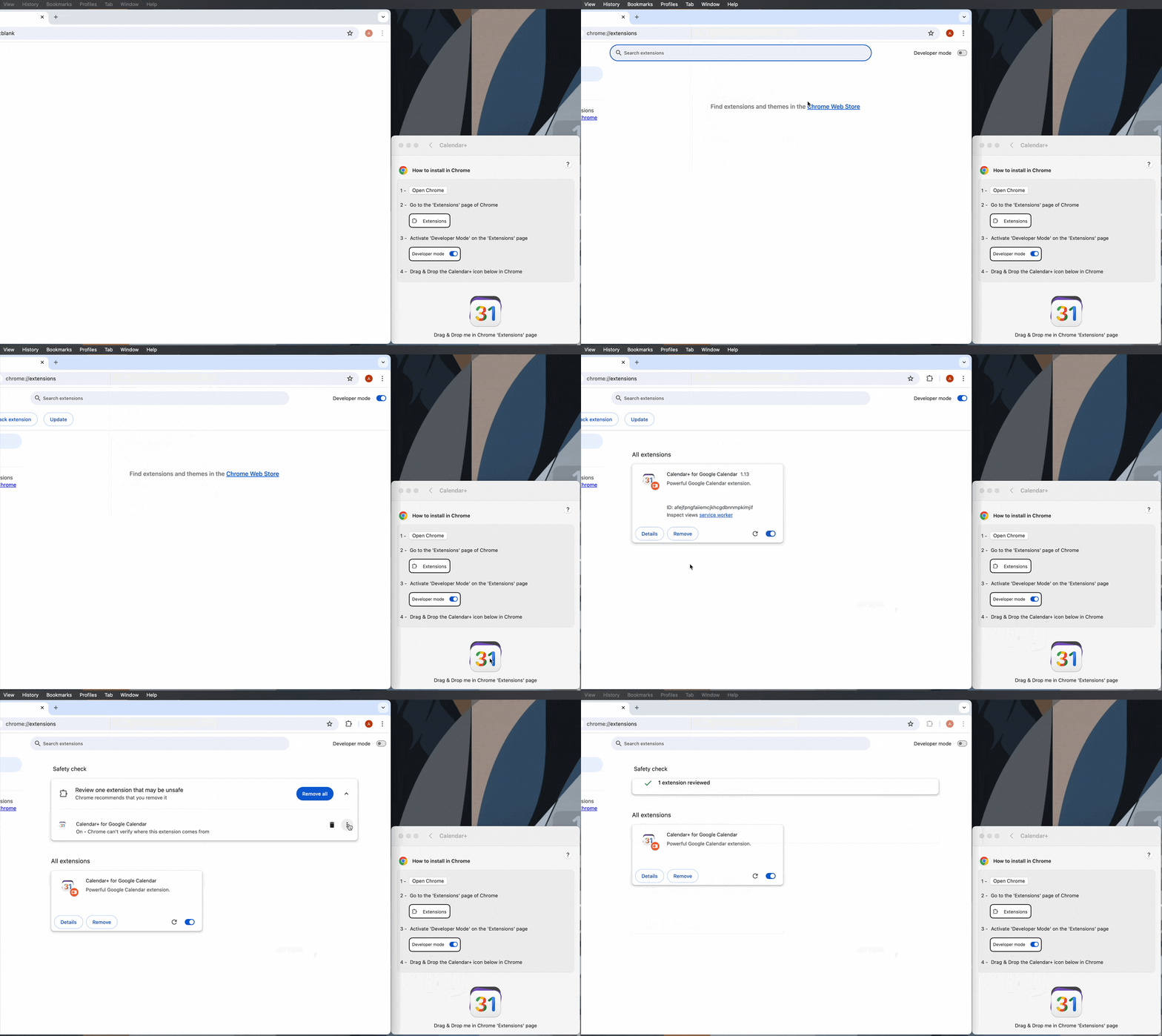
Steps to Install The CleanMyTube Extension
Open your Web browser.
In the web browser, go to the “Window” menu in the main menu bar and choose “Extensions.”
In the Extensions window, switch on “Developer mode” in the upper right corner.
If not launched already, launch the CleanMyTube app and select your web browser.
In the CleanMyTube app, select the bottom CleanMyTube icon.
Drop the CleanMyTube icon into the web browser Extensions window.
CleanMyTube is now installed in your web browser.
After installing CleanMyTube, you may disable “Developer mode” if you prefer.
You are now ready.
If you have questions, you can visit the F.A.Q page.